A new version of Widget runtime (1.1.0) is now out. It contains the following changes:
* Refactored architecture so that each widget is ran on it's on process
* Implemented support for WAC Webview API
* System's 'application not responding' dialog should now have correct widget name in case JavaScript is taking too long to execute
* Improved responsiveness during JavaScript-heavy operations by processing event loop
* Fixed upgrading a widget with version in format x.y to x.y.z to be considered a newer version if x, y and z are numbers
* Fixed uninstalling a widget not cleaning up any included hidden files
* Fixed links that use _blank as target
* Implemented error page for URLs that couldn't be fetched
More coming a bit later...
keskiviikko 29. elokuuta 2012

perjantai 10. elokuuta 2012
Widget Runtime for MeeGo is out!
Get it from http://store.ovi.com/content/302071 - and let me know what you think about it.
sunnuntai 5. elokuuta 2012
How to run Tizen widgets?
Before you even start asking, here are some instructions on how to get and run Tizen widgets on N9 with the widget runtime. At this time, you can get some example widgets from Tizen's developer resources but unfortunately those are meant for developers and are not properly packaged. Luckily we can make them work with a few small modifications. Follow these steps for each of the example widgets you want to try out:
- Download the widget to your computer, it comes in a .zip package
- Extract the package into an empty directory
- Go into the directory and follow the directory structure deeper until you get to a directory with the actual content (it should always have config.xml file in it)
- Open this config.xml in any text editor (don't use Windows' Notepad if it looks like all the content are on a single line... Notepad does not understand Linux-style line breaks, use some other editor instead, such as Notepad++)
- To avoid wrong scaling on N9 resolution, you need to define the correct resolution for the widget. Usually Tizen widgets seem to be using 1024x600 resolution which means you need to insert width="1024" height="600" attributes to the widget element.
- Since all the example widgets seems to require landscape orientation, you can force this orientation by adding <feature name="http://wacapps.net/api/viewport"><param name="orientation" value="landscape"/></feature> inside the widget element's content.
- After editing the config.xml, you need to rezip the content. You need to make sure the directory where the config.xml file resides in is the top level directory in the zipped package. I recommend using 7-Zip to easily do this from the context menu after selecting all the files and folders in the directory.
- The last and very important step is to rename the .zip file to use .wgt extention instead. After this, the widget package (.wgt file) is ready to be sent to your device. Bluetooth is likely the easiest way to send it to your device. After receiving the file, just open it from the transfers UI and the widget should open up, ready to be used!
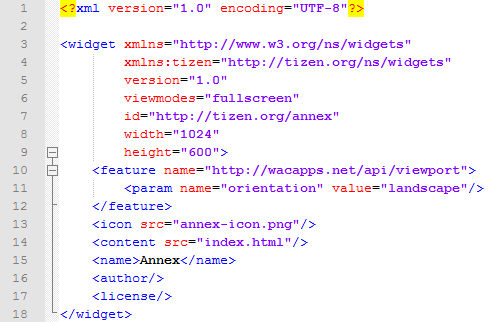 |
| Example Tizen configuration file with the recommended modifications |
 |
| The same example widget running fullscreen on my N9 |
keskiviikko 1. elokuuta 2012
Widgets!
Back with some good news. I've developed an application simply called "Widget Runtime" for the N9 that allows you to run your favorite web widgets on your favorite device. To be more exact, it currently supports widgets created for Symbian (.wgz file extension) and any W3C widget standards based widget (.wgt, such as ones created for Opera or Tizen). The application will come with a manager interface and a few bundled example widgets. It's still currently in a BETA stage so it will contain some bugs, but I'm working to make it better when ever I have the time. It will appear in the Nokia Store shortly.

Where are we on compatibility? Currently the focus is on W3C standards as well as basic support for Symbian widgets. At the moment here are the supported standards:
Some things that are planned for future releases:


Where are we on compatibility? Currently the focus is on W3C standards as well as basic support for Symbian widgets. At the moment here are the supported standards:
- W3C compliant widget packaging will be installable (I've reached 97.05% pass rate in W3C test suite)
- Widget Interface specified by W3C (100% pass rate!)
- W3C Geolocation API
- Widgets created for Opera runtime should mostly work, including "Live Icon" support (API compatibility reached, though there might be some issues left)
- Install and run basic Symbian widgets (some APIs are supported, but not the platform services)
- WAC2.0 Viewport Feature
Some things that are planned for future releases:
- Proper view-mode support (currently it is only supported through webkit prefixes)
- WAC2.0 compatible platform services
- Symbian compatible platform services
- Better architecture where each widget is ran on it's own process
I was for a long time very frustrated that Google Maps wasn't available to the N9 as I prefer it's maps to Nokia's. With my Widget Runtime, I was able to create a basic touch-enabled widget (see the screenshot below) in just about an hour! This widget comes bundled with the Widget Runtime and might get expanded features in the near future as well. Sadly, however, the widget crashes randomly due to a bug in QtWebkit that plagues the device :(

torstai 28. kesäkuuta 2012
Something entirely new
A few days ago, a new application I've created called Caller ID was released in Nokia Store. It's a handy application that gives you an opportunity to find out who calls you from any number not stored in your address book. You can either use the application to manually resolve identities behind any phone number or you can enable automatic resolution of unknown callers, which attempts to resolve the identity before you even answer the call. Usually resolving a number takes somewhere between 5 and 60 seconds depending on your carrier and selected service provider.
Caller ID uses public SMS services to find out the identity of the caller. These services are not provided by me and are unfortunately not free to use (since the application uses regular short messaging service, the costs are applied in you next carrier bill just as if you had manually sent the SMS to the service).
Currently Caller ID is only available in Finland because I don't know any foreign services working the same way as Finnish ones do. If you know a similar service in your country, please let me know and I'll add it to the application. Thanks!
torstai 1. maaliskuuta 2012
MeeCatalog and N9 1.2 update
It seems that some people are having issues with the new 1.2 system update for N9 failing at 0%. The problem has been identified (see comments by Santtu Ahonen at Nokia developer blog) to be caused by configured repositories that cannot be reached. The issue is NOT caused by MeeCatalog and MeeCatalog does not by default add any repositories.
If you have added custom repositories via MeeCatalog settings it is advised to disable them and refresh the catalog lists (the button in the middle of the toolbar on MeeCatalog) before updating your system software. Note that you cannot disable repositories added by other applications using MeeCatalog.
If you have added custom repositories via MeeCatalog settings it is advised to disable them and refresh the catalog lists (the button in the middle of the toolbar on MeeCatalog) before updating your system software. Note that you cannot disable repositories added by other applications using MeeCatalog.
keskiviikko 18. tammikuuta 2012
New version is out!
Just a few hours ago, a new version of MeeCatalog was made public in the Ovi Store. The main improvement is the support for configurable application catalogs. Catch it from http://store.ovi.com/content/220215.
Tilaa:
Blogitekstit (Atom)